Fixing Ghosting Rings on Cylindrical Lithophane Night Light Bases
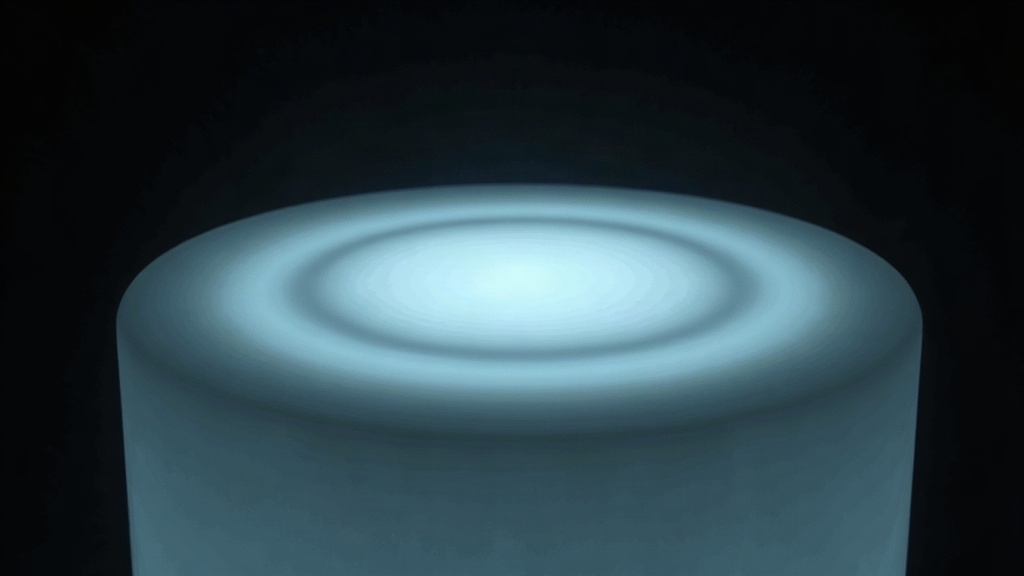
If your cylindrical lithophane night light glows with faint horizontal rings or “ghost” bands, but your flat lithophanes print clean every time, the culprit almost always comes down to one thing: round, thin-walled geometry doesn’t play nice with cooling, extrusion consistency, and layer adhesion the way flat geometry does. Here’s why ghosting shows up specifically on curved lithophane bases, and what actually fixes it.
What “Ghosting Rings” Actually Look Like
When you backlight a lamp and see ghosting, here’s what you’re dealing with:
- Faint horizontal bands, slightly brighter or darker than the layers around them
- A pattern that repeats every few millimeters in height, often tied to a fixed layer interval
- Bands that only show up when the light’s on. Look at the same print in daylight, unlit, and you won’t see a thing.
Don’t confuse this with mechanical “ringing,” the echo-like artifacts you get near sharp corners from vibration. A cylinder has no sharp corners to ring off of. So if you’re seeing bands on a round lithophane, you’re looking at a density or thickness variation problem, not a resonance issue, even though both get called “ghosting.”
Why It Happens Only on Cylindrical Bases (Not Flat Ones)
1. Inconsistent Extrusion on Curved Walls
On a flat lithophane, the nozzle glides along straight lines at a steady feedrate. On a cylinder, it’s constantly speeding up and slowing down through the curve, especially if your slicer is approximating the circle with a bunch of short line segments instead of a true arc. Those tiny speed changes shift extrusion width by fractions of a millimeter, which is more than enough to alter how light passes through translucent PLA.
Fix: Tighten the arc/curve resolution in your slicer. Lower the “maximum deviation” or “resolution” setting, try 0.01–0.02 mm instead of the default 0.05–0.1 mm, so the toolpath stays smooth and speed doesn’t fluctuate.
2. Cooling Fan Airflow Shadow
Picture a cylinder spinning past a single-sided fan duct, layer after layer. Every rotation, the “front” of the model passes the airflow while the back side barely feels it. If your duct isn’t symmetric, one side cools more per layer than the other, and that tiny imbalance compounds over hundreds of rotations into a visible ring every N layers, usually matching your Z-hop interval or retraction cycle.
Fix:
- If you print round objects regularly, switch to a symmetric or dual-fan duct
- Lock fan speed to a constant value rather than letting it vary or adapt per layer
- Turn off “fan speed increases on small layers” style settings. On round prints with shifting layer circumference, this setting alone can create a periodic density shift.
3. Z-Seam Alignment Creating a Visible Seam Line
Every layer has a start and stop point, the Z-seam, and that restart always leaves a tiny blob or dip in the extrusion. On a flat print, you can usually tuck that seam along a hidden back edge and forget about it. On a cylindrical lamp, “aligned” seam mode stacks the blip in the same spot every layer, giving you a visible vertical line. Set it to “random” instead and those same artifacts scatter across the surface, which under backlighting reads as ring-like noise.
Fix:
- Set Z-seam to “aligned” and place it deliberately at the design’s least-visible point (usually the back, away from where people will actually look)
- If your slicer supports it (PrusaSlicer 2.6+, Cura 5.3+), turn on “seam gap” or “scarf seam” to taper the transition instead of an abrupt stop/start
4. Retraction and Pressure Advance Inconsistency
A cylindrical lithophane is basically one long spiral toolpath. If retraction or pressure advance (linear advance, in Marlin terms) isn’t dialed in, pressure inside the nozzle can build slightly after each full rotation, thickening the wall just enough, at a regular interval, to show up when lit.
Fix:
- Run a pressure advance calibration tower and tune it specifically for this
- On direct drive setups, cut retraction distance down (0.4–0.8 mm is usually plenty)
- Hold speed constant through curves. Watch for slicers that spike speed when they detect “short segments,” since that’s exactly where this problem originates.
Quick Diagnostic Checklist
- Dim the room, light the lamp, and rotate it slowly. Evenly spaced rings point to cooling or a layer cycle issue. Random spacing points to extrusion or retraction.
- Compare layer height against your fan cycle. Rings repeating every 4-6 layers? Suspect adaptive cooling first.
- Look at where the Z-seam sits. If the rings cluster near one vertical line, that’s a seam problem, not true ringing.
- Print a plain cylinder with no lithophane image, same settings. If the rings still show up, you’ve confirmed it’s mechanical or thermal, not something in the image processing.
Settings That Help Across the Board
- Layer height: 0.1–0.12 mm for lithophanes (thinner layers hide banding on curves far better than thicker ones)
- Wall line width: set it to match your nozzle diameter exactly, don’t let auto-width drift
- Print speed: hold it at 30–40 mm/s constant, skip the speed ramps
- Cooling: 100% fan, constant, symmetric duct
- Infill: not really relevant here, lithophane walls are usually a single solid wall, vase mode or near-solid
Conclusion
Ghosting rings on a cylindrical lithophane night light aren’t a flaw in your image. They’re the print process repeating a tiny imperfection once per rotation, whether that’s uneven cooling, a Z-seam restart, or extrusion drifting through curves. Print a plain test cylinder to confirm it, place your Z-seam on purpose, tighten your curve resolution, and keep cooling constant and symmetric. Get those four things right and you’ll clear up nearly every ring artifact that shows up on round lithophane lamps.